Create e-invoices with ease: ZUGFeRD & XRechnung directly from BillMore
Write your invoice as usual, choose the format, done. For freelancers, start-ups and SMEs – ready for the German e-invoicing mandate in 2027 and 2028.
The trial ends automatically – no cancellation needed.
- 4.72,600+ reviews on the App Store
- Developed in Germany
- Support by email and phone

E-invoicing mandate
The German e-invoicing mandate in three steps
A PDF invoice sent by email is not an e-invoice. The law means structured, machine-readable formats such as ZUGFeRD and XRechnung. The mandate applies to invoices between businesses in Germany and is introduced in stages:
Since 1 January 2025
Receive e-invoices
All companies in Germany must be able to accept e-invoices – including small traders.
- Next deadline
From 1 January 2027
Issue above €800,000 turnover
Companies with more than €800,000 total turnover in the previous year must issue e-invoices.
From 1 January 2028
Issue for everyone
The transition period ends: invoices to businesses must be issued as e-invoices.
Exempt are small traders under § 19 UStG (German small business scheme), low-value invoices up to €250 and invoices to private individuals.
For binding information about your legal obligations, please consult your tax advisor.
Supported formats
ZUGFeRD or XRechnung – you choose
Both formats are based on the European standard EN 16931. Which one suits you depends on your use case.
ZUGFeRD
Hybrid format – PDF + XML, EN 16931 profile
ZUGFeRD combines a readable PDF file with an embedded XML file. This makes the invoice readable for both humans and machines.
- PDF and XML in a single file
- Directly readable like a normal PDF file
- Machine-processable
- Suitable for general B2B invoices
XRechnung 3.0
Pure XML format (UBL)
XRechnung is a purely structured XML format that is machine-readable only. It is used in particular for invoices to public-sector clients.
- Pure XML, no PDF file included
- Fully machine-readable
- Standard for public-sector clients
- Often required for B2G invoices
Workflow
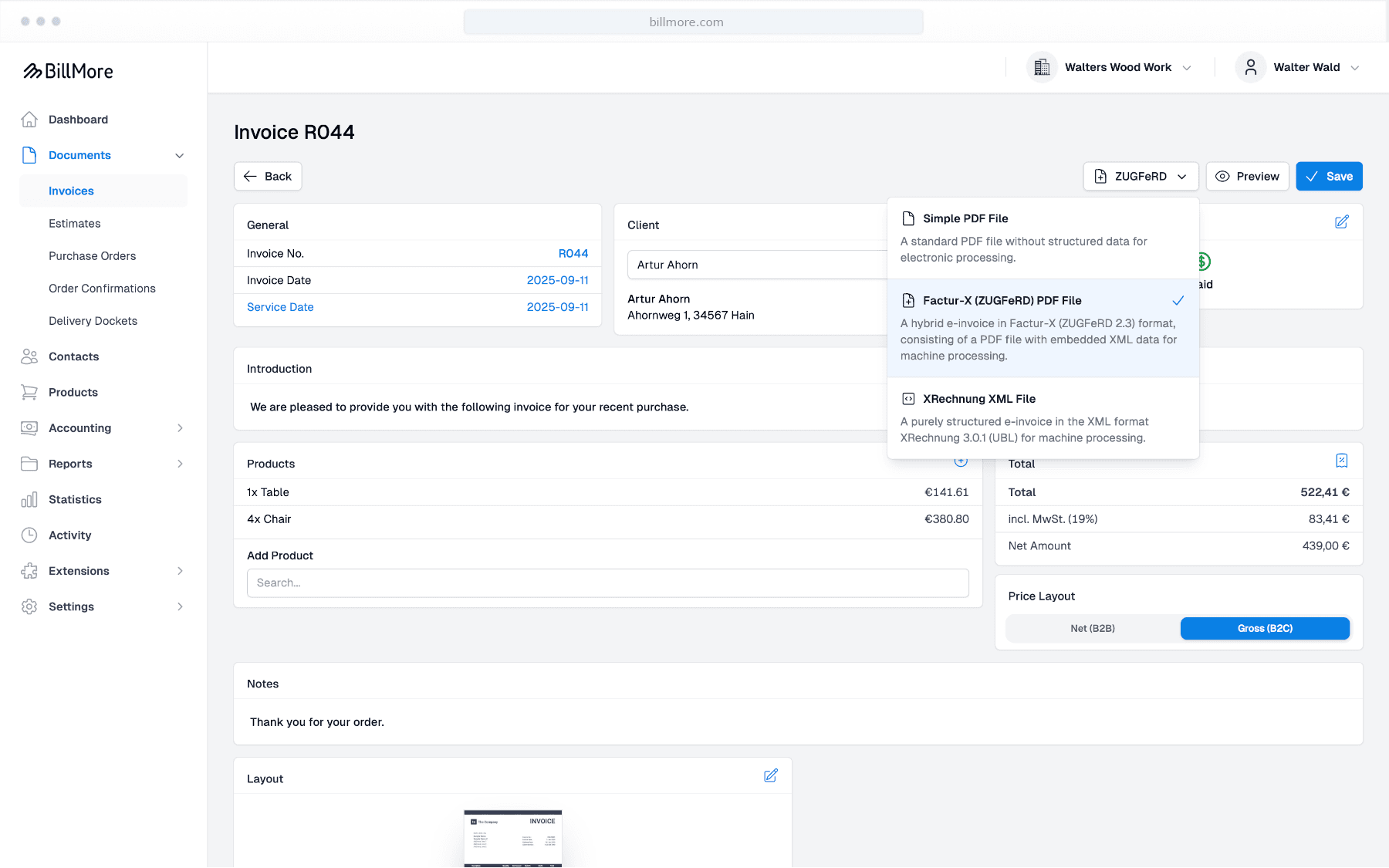
Three steps to your e-invoice
Create the invoice
Create your invoice as usual in BillMore – select a contact, add items, enter prices.
Choose the format
During file selection, choose the desired format: normal PDF, ZUGFeRD or XRechnung.
Export or send
Download the e-invoice or send it directly by email straight from BillMore.
Pricing
E-invoices from just €3.00 per month
E-invoices are included in every plan. The plans only differ in the number of documents, users, companies and AI booking suggestions. Unlimited includes one company, each additional company costs 7,50 € per month (up to 5 companies).
Basic
3,00 €/ month
- E-invoices as ZUGFeRD and XRechnung
- 5 documents per month
- 1 user
- 1 company
- 10 AI booking suggestions per month
Standard
8,00 €/ month
- E-invoices as ZUGFeRD and XRechnung
- 50 documents per month
- 5 users
- 1 company
- 50 AI booking suggestions per month
Unlimited
15,00 €/ month
- E-invoices as ZUGFeRD and XRechnung
- Unlimited documents
- 10 users
- Multiple companies possible
- 100 AI booking suggestions per month
All prices excl. VAT. Prices in the App Store may differ slightly.
Receiving
Receive and read incoming e-invoices
Since 2025, every company in Germany must be able to receive e-invoices – regardless of whether it has to issue them yet. BillMore has you covered on both sides.
Read incoming e-invoices
Upload ZUGFeRD or XRechnung files to BillMore. BillMore reads out the data and displays the invoice in a clear, readable form.
Further details
What else is included
Validated before export
BillMore validates every e-invoice against the official rule sets (XML schema and Schematron) before export and shows you any errors before the file reaches the recipient.
Send directly by email
You can send the finished e-invoice directly from BillMore by email – without manually exporting it to a separate email program.
Cancellation invoices as e-invoices
When you cancel an e-invoice, BillMore also generates an e-invoice for the cancellation invoice – in the same format as the original invoice.
FAQ
Frequently asked questions about e-invoicing
Is a PDF invoice an e-invoice?
No. Since 2025, a plain PDF file counts as an "other invoice" under German law. An e-invoice contains the invoice data in a structured, machine-readable format such as ZUGFeRD or XRechnung.
ZUGFeRD or XRechnung – which format should I choose?
ZUGFeRD suits most invoices to businesses because the recipient also receives a readable PDF. XRechnung is a pure XML format and is mainly required by public-sector clients. In BillMore you choose the format for each invoice.
Which formats does BillMore support?
BillMore creates ZUGFeRD invoices in the EN 16931 profile and XRechnung 3.0 (UBL). Both formats are based on the European standard EN 16931. Every e-invoice is validated against the official rule sets before export.
Can I receive e-invoices with BillMore?
Yes. Upload ZUGFeRD or XRechnung files, and BillMore reads out the data and displays the invoice in a readable form.
Can I try BillMore for free?
Yes, for 30 days with almost all features. The trial ends automatically and is not converted into a paid subscription.
More answers in our FAQ.
Get started with BillMore
30 days free trial
Create a free account and test BillMore with almost all of its features - completely risk-free.
Contact
If you have any questions about using our app or would like to send us suggestions for improvement, we are available to you at any time in the following ways.
By email
Do you have any questions about using the app? Our team will be happy to help you. We try to answer all inquiries within 2-3 working days.
On the phone
We are happy to help you by phone. Our team is available around the clock. If you have specific technical questions, please send us an email.