Upload a receipt, and the booking is ready
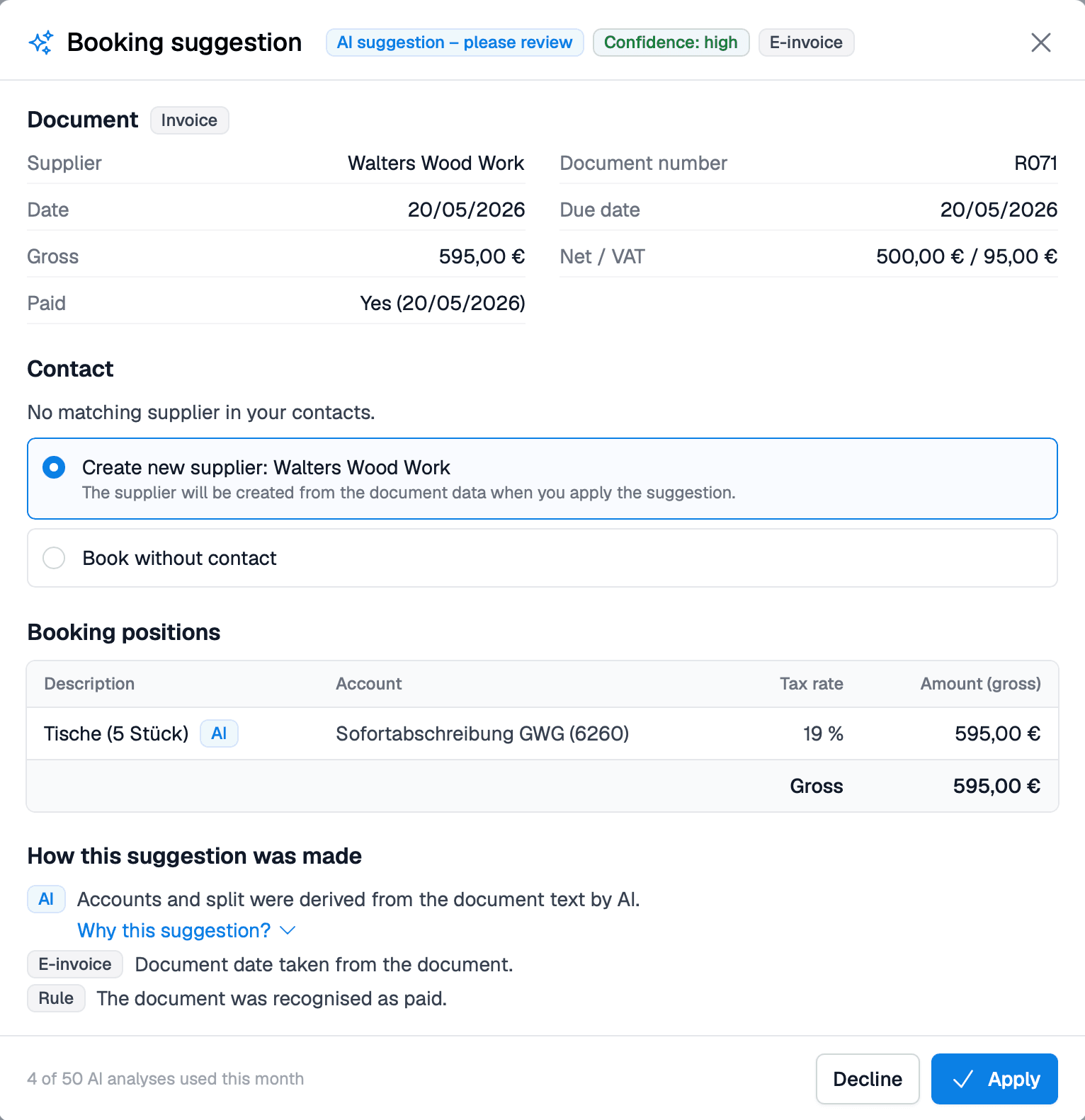
A photo or a PDF is enough. BillMore creates the expense from the receipt. You review the suggestion and save it – only what you confirm is booked.
How it works
BillMore fills it in. You review.
BillMore recognizes the supplier, takes the data from the receipt and suggests the account and tax rate. You change anything that is wrong. It is saved only when you accept the suggestion.
- E-invoice.
- BillMore reads XRechnung and ZUGFeRD directly from the invoice data – quickly and without AI.
- Photo from your phone.
- Receipt, scan or PDF: the AI reads what is on the receipt.
Analysis runs in the EU. Your receipts are not used for training, and the suggestions are not tax advice. More about accounting →
Benefits
Less typing, less looking things up
Three things you no longer do yourself for an expense receipt.
Nothing to copy
Supplier, amount and date are already on the expense. A receipt number you have already recorded is flagged.
The account is chosen
BillMore suggests the account and tax rate. For a receipt in a foreign currency, it also suggests an exchange rate.
Known suppliers
You booked the rent for August. In September the same booking comes back – only the month is new.
Your decision
Booked only when you confirm
The suggestion is a draft, not a booking. You decide what goes into your expenses.
You can see how confident the suggestion is
High, medium or low – plus a short reason why BillMore suggests it.
Every line can be changed
Account, amount or supplier not right? You correct it before anything is saved.
Nothing is booked until you save
The suggestion only pre-fills the expense. Nothing happens without your click.
FAQ
Common questions about AI receipt recognition
Which receipts can BillMore read?
Photos, scans and PDFs of expense receipts, plus incoming e-invoices in XRechnung or ZUGFeRD format.
How can I tell how confident the suggestion is?
Each suggestion shows a confidence level: high, medium or low. You also see a short reason and notes, for example for a reminder, foreign VAT, or a date in the future.
Are my receipts used to train the AI?
No. Analysis runs with an AI service in the EU, and your receipts are not used to train AI models. BillMore only remembers how you booked a supplier’s receipts, and only for your company.
What happens with a receipt in a foreign currency?
BillMore suggests a reference rate. What counts is the amount that was actually charged to your account. You enter that yourself.
Is the booking transferred to DATEV automatically?
No. BillMore saves the expense. The handoff to DATEV remains a separate step.
More answers are in the FAQ.
Get started with BillMore
30 days free trial
Create a free account and test BillMore with almost all of its features - completely risk-free.
Contact
If you have any questions about using our app or would like to send us suggestions for improvement, we are available to you at any time in the following ways.
By email
Do you have any questions about using the app? Our team will be happy to help you. We try to answer all inquiries within 2-3 working days.
On the phone
We are happy to help you by phone. Our team is available around the clock. If you have specific technical questions, please send us an email.